Using a Combo Box to Select a Screen
The following example walks through the creation of a simple screen that includes a combo box for selecting different screen files, and a button to launch the selected screen. It demonstrates how to add elements to a combo box in Edit mode and change the screen displayed by a Hyperlink button in Run mode.
Using a Combo Box to Enable Screen Selection and Launch
- Open a new Studio file and add a Combo Box
 to the View. Set its (ObjectCode) property to "cboViews."
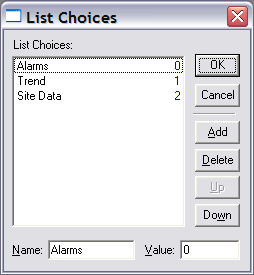
 - Click the value field of the ListItems property to open the List Choices dialog box. Click the Add button to create a list item. Change the text in the Name field to "Alarms" and leave the default value in the Value field.
- Click the Add button two more times to create two new list items, and fill in the names as shown below, leaving the default values.
|
List Choices |
- Click OK in the dialog box.
- Change the combo box’s NumDropped property to 3 to drop all three items in the menu.
- Click the button tool
 in the object bar, then click TheView next to the combo box to place a button.
 - In the button’s properties, change the (ObjectCode) to "btnGo."
- Change the button’s Text property to "Go."
- Ensure that HyperLink is selected in the button’s [ButtonType] property.
- If you want, use the text tool
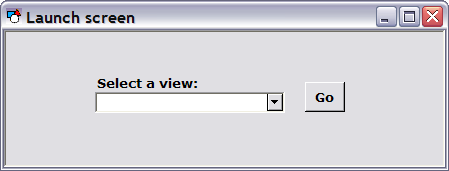
 to create a label above the combo box to read "Select a view." The screen will look something like the one below.
|
Select a View |
- Double-click the combo box to open the script editor. Navigate to the cboViews EventChange event.
- Enter the script as shown below. Change the names and locations of the screen files (here loaded from a fictitious MYSITE.BSS Blob) to match screens on your system.
Copy
Select Screen
Sub cboViews_EventChange()
Dim This : Set This = cboViews
Select Case This.Value
Case 0:
btnGo.FilePath = "MYSITE.BSS\SCREENS\Alarms.csf "
Case 1:
btnGo.FilePath = "MYSITE.BSS\SCREENS\Trend.csf"
Case 2:
btnGo.FilePath = "MYSITE.BSS\SCREENS\SiteData.csf"
End Select
End Sub- Switch to Run mode. Try selecting a view name from the combo box and ensure that the Go button displays a different screen based on the selection.


